Senin, 13 Juni 2011

ebook - Microsoft Project 2010 : Step by Step

Microsoft Project 2010 : Step by Step | Carl Chatfield, PMP and Timothy Johnson, MCP | Microsoft Press | 2010 | English | 505 p | pdf | 29.41 MB | ISBN: 0735626952 | Microsoft Project 2010 is a powerful program that helps you plan and manage a wide range of projects. From meeting crucial deadlines and budgets to selecting the right resources, Project 2010 offers easier and more intuitive experiences to help you be more productive and realize better results. If you’re upgrading to Project 2010 from a previous version, you’re probably most interested in the differences between the old and new versions and how they will affect you. The following sections list new features you will want to be aware of, depending on the version of Project you are upgrading from.
ebook - Microsoft Project 2010 : Step by Step
Book Title
:
Microsoft Project 2010 : Step by Step
Author
:
Carl Chatfield, PMP and Timothy Johnson, MCP
Publisher
:
Microsoft Press
Year
:
2010
Language
:
English
Page
:
505
File Format
:
pdf
File Size
:
29.41 MB
Introducing Microsoft Project 2010
Microsoft Project 2010 is a powerful program that helps you plan and manage a wide range of projects. From meeting crucial deadlines and budgets to selecting the right resources, Project 2010 offers easier and more intuitive experiences to help you be more productive and realize better results. You can use Project to:
  • Create project plans at the level of detail that’s right for your project. Work with summary data initially or shift to a more detailed approach when it’s convenient. Control what tasks Project can schedule automatically or that you’ll schedule manually.
  • Manage tasks, costs, work, and resources at whatever level of detail is appropriate for your project’s needs.
  • See your project plan data in a variety of views. Apply grouping, highlighting, sorting, and filtering to see your data the way that you want.
  • Track and manage your project plan throughout project execution.
  • Collaborate and share data with others in your organization using a variety of productivity applications.
  • Use resource pools, consolidated projects, and cross-project links to extend your project management focus across multiple projects.
Project 2010 builds on previous versions to provide powerful project management tools. This introduction provides an overview of new features that we explore throughout the book.
New Features
If you’re upgrading to Project 2010 from a previous version, you’re probably most interested in the differences between the old and new versions and how they will affect you. The following sections list new features you will want to be aware of, depending on the version of Project you are upgrading from.
Contents at a Glance
Table of Contents
Introduction
Part 1 Simple Scheduling
1
A Guided Tour of Project
2
Creating a Task List
3
Setting Up Resources
4
Assigning Resources to Tasks
5
Formatting and Sharing Your Plan
6
Tracking Progress on Tasks
Part 2 Advanced Scheduling
7
Fine-Tuning Task Details
8
Fine-Tuning Resource Details
9
Fine-Tuning Assignment Details
10
Fine-Tuning the Project Plan
11
Organizing Project Details
12
Tracking Progress on Tasks and Assignments
13
Viewing and Reporting Project Status
14
Getting Your Project Back on Track
Part 3 Special Subjects
15
Applying Advanced Formatting and Printing
16
Customizing Project
17
Sharing Project Information with Other Programs
18
Consolidating Projects and Resources
Part 4 Appendices
A
A Short Course in Project Management
B
Roadmap for Developing Your Project and Project Management Skills
C
Using the Practice Files if Connected to Project Server
D
Using Microsoft Project 2010 Step by Step in a Classroom: Suggestions for Instructors
Glossary
Index

Microsoft Office Professional Plus 2010, Microsoft Project 2010 dan Microsoft Visio 2010 (All in One - Auto Activation)

Microsoft Office Professional Plus 2010, Microsoft Poject 2010 dan Microsoft Visio 2010 (All in One)Free Download Microsoft Office Professional Plus 2010, Microsoft Poject 2010 dan Microsoft Visio 2010 (All in One) - Microsoft Office, adalah software yang sudah sangat populer dan banyak digunakan. Tentunya anda sudah tidak asing lagi dengan Microsoft Office. Pada postingan ini, webtekniksipil ingin share Paket Microsoft Office Professional Black Edition, dimana dalam paket ini sudah termasuk Microsoft Office Professional Plus 2010 versi 14.0.4760.1000 (Ms. Word 2010, Ms. Excel 2010, Ms. Power Point 2010, Ms. Access 2010, Ms. Outlook 2010, Ms. Publisher 2010), Microsoft Visio Premium 2010, Microsoft Project Professional 2010, 'plus' Auto Activated dengan Office 2010 Toolkit, dan Office Tab 6.00 yang terbundel dalam satu paket. Semua Tweaks, Add-Ins dan Activation, sudah terbundel dalam Office 2010 Installer, sehingga proses instalasi dan aktivasinya sangat mudah.
Tidak perlu trik khusus untuk melakukan aktivasi. Aktivasi akan dilakukan secara otomatis pada saat instalasi, karena aktivatornya di compile bersama-sama dengan installlernya.
Kekurangannya adalah, untuk installasi Microsoft Office 2010, Microsoft Visio 2010 dan Microsoft Project 2010, harus dilakukan satu-persatu. Jadi untuk menginstall ketiga produk ini, anda harus melakukan tiga kali installasi. Namun kekurangan ini, sekaligus menjadi kelebihan, yaitu anda dapat memilih apakah hanya menginstall Microsoft Office saja, atau Microsoft Visio saja atau Microsoft Project saja, sesuai dengan kebutuhan anda.
Screenshoot :
Pilihan Installasi Microsoft Office 2010
Pilihan Instalasi Microsoft Office 2010
Microsoft Word 2010 (tentang produk)
Microsoft Word 2010 Acivated
Microsoft Excel 2010 (tentang produk)
Microsoft Excel 2010 Acivated
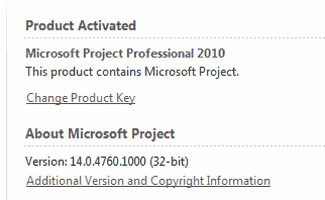
Microsoft Project 2010 (tentang produk)
Microsoft Project 2010 Acivated
Microsoft Visio 2010 (tentang produk)
Microsoft Visio 2010 Acivated
Kelebihan lain dari produk ini adalah kompatibel dengan Windows versi 32-bit maupun 64-bit, atau dapat digunakan pada windows versi 32-bit maupun 64-bit.
Microsoft Office 2010, memiliki kemampuan untuk menyimpan file ke dalam format PDF. Anda dapat membuat file PDF, menggunakan Microsoft Office 2010. Anda cukup 'Save As' file word atau excel, kemudian pilih format file PDF. ( Jika anda ingin membuat, edit, atau konversi file PDF dengan fasilitas yang lebih lengkap, silahkan baca artikel ini ). Selain itu, kelebihan Microsoft Office 2010 Professional juga startup-nya jauh lebih cepat dibandingkan MS Office 2007, lebih user friendly, dan lebih keren dengan temanya yang sangat cocok untuk Windows 7.
System Requirements
  • Processor : 500 megahertz (MHz) processor or higher;
  • Memory : 256 megabyte (MB) RAM or higher;
  • Hard Disk : 1.5 GB; a portion of the disk space will be freed after installation if the original download package is removed from the hard drive;
  • Display : 1024x768 or higher resolution monitor;
  • Operating System : Windows XP with Service Pack (SP3) (32-bit), Windows Vista with SP1 (32-bit or 64-bit), Windows Server 2003 with SP2 and MSXML 6.0 (32-bit Office only), Windows Server 2008 with SP2 (32-bit or 64-bit), Windows 7 (32-bit or 64-bit). Windows on Windows (WOW) (which allows installing 32-bit versions of Office 2010 on 64-bit operating systems) are supported;
  • Other : You don't need to replace hardware that is capable of running Office 2007; it will support Office 2010;
  • Additional : Use of graphics hardware acceleration requires DirectX 9.0c compatible graphics card with 64 MB or higher video memory. Requirements and product functionality can vary based on the system configuration and operating system.
Cara Install Microsoft Office Professional Plus 2010 :
  1. Untuk File yang di Download melalui Direct Link :
    -  Download semua Part ( 16 Part );
    -  Pilih pada salah satu file, kemudian ekstrak dengan WinRAR.
  2. Burn, Mount atau Extract ISO file ;
  3. Jalankan file 'Setup.exe' ;
  4. Pilih produk yang akan diinstall ; ( Microsoft Office Professional Plus 2010, Microsoft Project Professional 2010 atau Microsoft Visio Premium 2010 ).
  5. Untuk menginstall produk yang lain,
    Jalankan lagi file 'Setup.exe' . Pilih produk yang akan diinstall ;
  6. Restart Komputer, untuk menyelesaikan aktivasi.
cat:
Untuk berjaga-jaga agar proses aktivasi berjalan sukses.
Matikan koneksi internet sebelum installasi dimulai, selama proses installasi sampai aktivasi selesai.
* Tested by : webtekniksipil
Windows 7 Enterprise x64 SP1
Windows 7 Ultimate x64 SP1
Windows 7 Home Premium x64 SP1
Windows 7 Ultimate x32 SP1
Windows Vista Professional x32 SP1
Official Site : http://www.microsoft.com

Senin, 06 Juni 2011

Microsoft Access 2010 ebook Series

Microsoft Access 2010 ebook seriesFree Download - Microsoft Access 2010 ebook Series, Is a collection of eBooks Microsoft Access 2010. Consists of five books, including: Microsoft Access® 2010 Bible, Access 2010 The Missing Manual, Microsoft® Access® 2010 VBA Programming Inside Out, Microsoft® Access® 2010: Complete; SHELLY CASHMAN SERIES, and Micrososft® Access® 2010 In Depth.
All of which you can download for free.
Access® 2010 Bible
Author
:
Michael R. Groh
Publisher
:
Wiley Publishing, Inc.
Year
:
2010
Language
:
English
Page
:
1395 p
File Format
:
pdf
File Size
:
29.01 MB
Free download ebook - Access® 2010 Bible.
ebook - Access 2010 The Missing Manual
Author
:
Matthew MacDonald
Publisher
:
O’Reilly Media, Inc.
Year
:
2010
Language
:
English
Page
:
832 p
File Format
:
pdf
File Size
:
11.91 MB
Free download ebook - Access 2010 The Missing Manual.
Microsoft® Access® 2010 VBA Programming Inside Out
Author
:
Andrew Couch
Publisher
:
O’Reilly Media, Inc.
Year
:
2011
Language
:
English
Page
:
738 p
File Format
:
pdf
File Size
:
24.44 MB
Free download ebook - Microsoft® Access® 2010 VBA Programming Inside Out.
Microsoft® Access® 2010: Complete
Author
:
Gary B. Shelly; Philip J. Pratt; Mary Z. Last
Publisher
:
Course Technology,
Cengage Learning
Year
:
2011
Language
:
English
Page
:
564 p
File Format
:
pdf
File Size
:
33.97 MB
Free download ebook - Microsoft® Access® 2010: Complete, SHELLY CASHMAN SERIES.
Micrososft® Access® 2010 In Depth
Author
:
Roger Jennings
Publisher
:
Que
Pearson Education, Inc.
Year
:
2011
Language
:
English
Page
:
1548 p
File Format
:
pdf
File Size
:
127,49 MB
Free download ebook - Micrososft® Access® 2010 In Depth.

Minggu, 05 Juni 2011

ebook - Microsoft Project 2010 Project Management: Real World Skills for Certification and Beyond

Microsoft Project 2010 Project Management : Real World Skills for Certification and Beyond | Robert Happy, PMP, MCT | SYBEX, Wiley Publishing, Inc. | 2010 | English | 455 p | pdf | 36.96 MB | ISBN: 978-0-470-56110-2 | This is a practical book for all users of Microsoft Project who need to plan, track, and communicate effectively for any type of project. Whether you’re a more casual project manager or a professional project manager, this book delivers a sensible approach to using Project 2010 based on best practices around project management. It embodies proven effective learning techniques gleaned from years of consulting and teaching experience. Whether you need to build simple plans or more complex plans with Project, this book shows you how to use powerful tools and techniques to better manage your projects. I’ve been training and consulting with Microsoft Project since the release of earlier versions nearly 20 years ago and as such have perfected the optimal approach to transfer knowledge efficiently so you can get the most out of the software.
ebook - Microsoft Project 2010 Project Management: Real World Skills for Certification and Beyond
Book Title
:
Microsoft Project 2010 Project Management
Real World Skills for Certification and Beyond
Author
:
Robert Happy, PMP, MCT
Publisher
:
SYBEX
Wiley Publishing, Inc.
Year
:
2010
Language
:
English
Page
:
455 p
File Format
:
pdf
File Size
:
36.96 MB
This is a practical book for all users of Microsoft Project who need to plan, track, and communicate effectively for any type of project. Whether you’re a more casual project manager or a professional project manager, this book delivers a sensible approach to using Project 2010 based on best practices around project management. It embodies proven effective learning techniques gleaned from years of consulting and teaching experience.
Whether you need to build simple plans or more complex plans with Project, this book shows you how to use powerful tools and techniques to better manage your projects. I’ve been training and consulting with Microsoft Project since the release of earlier versions nearly 20 years ago and as such have perfected the optimal approach to transfer knowledge efficiently so you can get the most out of the software.
Working with Project isn’t like using other Microsoft Office products—such as Word, Excel, or PowerPoint—in that it requires you to have some core knowledge and understanding of project management in conjunction with the application. This book ties the primary project-management concepts to the appropriate functions in Microsoft Project, resulting in your increased productivity and effectiveness. This is neither a beginner, an intermediate, nor an advanced course but rather a comprehensive program with the core building blocks to support your projects from planning, monitoring, and controlling through closing. So, no matter what level of expertise you have with Microsoft Project, this book will help you optimize your use of the tool.
Although this book is a practical, hands-on guide, it’s also designed to prepare you for the Microsoft Certifications 77-178 Exam—Microsoft Project 2010, Managing Projects. Candidates for this exam should have experience effectively scheduling, communicating, and tracking projects using the desktop version of Project 2010 Standard and Professional (excluding Project Server features). The exam will be a live-app or performance-based exam designed to measure your skill based on outcome and not necessarily on how you perform the tasks. The attached CD.
Contents at a Glance
Table of Contents
Introduction
Part I Getting Started the Right Way
Chapter 1 Project 2010 as an Enabling Tool for Project Managers
Chapter 2 Mapping the Project-Management Process Groups to Microsoft Project 2010
Chapter 3 Overview of Enterprise Project Management
Chapter 4 Getting Started and Setting Up the Microsoft Project Environment
Part II Planning Essentials
Chapter 5 Creating and Entering the Work Breakdown Structure and Task Arrangement
Chapter 6 Estimating and Entering Duration or Work
Chapter 7 Setting Dependencies and the Critical Path
Chapter 5: Creating Chapter 8 Assigning Resources and Costs
Chapter 9 Understanding the Calculation Engine for Automatic Scheduling
Part III Communicating and Reporting Essentials
Chapter 10 Understanding Views
Chapter 11 Using Tables and Custom Fields
Chapter 12 Using Filters, Groups, and Sorts
Chapter 13 Creating Custom Views, Formatting, and Reporting
Chapter 14 Creating Master Schedules with Inserted Projects
Part IV Tracking and Analyzing Essentials
Chapter 15 Setting and Maintaining Baselines
Chapter 16 Updating and Tracking Status
Chapter 17 Variance Analysis and Taking Corrective Action
Appendix A Microsoft’s Certification Program
Appendix B About the Companion CD
Index

Sabtu, 04 Juni 2011

Pedoman Perencanaan Dan Pelaksanaan Perkuatan Tanah Dengan Geosintetik

PEDOMAN KONSTRUKSI DAN BANGUNAN, No. 003/BM/2009: Perencanaan Dan Pelaksanaan Perkuatan Tanah Dengan Geosintetik | Departemen Pekerjaan Umum, Direktorat Jenderal Bina Marga, Direktorat Bina Teknik | 2009 | 178 h | pdf | 4.11 MB | Pedoman Perencanaan dan Pelaksanaan Perkuatan Tanah dengan Geosintetik ini mencakup perkuatan timbunan di atas tanah lunak, lereng tanah yang diperkuat dinding tanah yang distabilisasi secara mekanis dengan menggunakan perkuatan geosintetik (geotekstil dan geogrid). Selain itu, pedoman ini juga memberikan penjelasan umum tentang geosintetik, persyaratan bahan timbunan, dan persyaratan geosintetik. Acuan utama pedoman ini adalah Geosynthetics Design and Construction Guidelines (Publication No. FHWA HI-95-038), Mechanically Stabilized Earth Walls and Reinforced Soil Slopes Design and Construction Guidelines (Publication No. FHWA-NHI-00-043) serta Konsep Pedoman Perkuatan dengan Geotekstil dan Geogrid hasil konsensus 15 November 2007 yang disusun oleh Pusat Penelitian dan Pengembangan Jalan dan Jembatan, Badan Penelitian dan Pengembangan, Departemen Pekerjaan Umum.
Perencanaan Dan Pelaksanaan Perkuatan Tanah Dengan Geosintetik
Judul Dokumen
:
PEDOMAN KONSTRUKSI DAN BANGUNAN
No. 003/BM/2009
Perencanaan Dan Pelaksanaan Perkuatan Tanah Dengan Geosintetik
Penerbit
:
Departemen Pekerjaan Umum, Direktorat Jenderal Bina Marga, Direktorat Bina Teknik
Tahun
:
2009
Halaman
:
178 h
Format File
:
pdf
Ukuran File
:
4.11 MB
Pedoman Perencanaan dan Pelaksanaan Perkuatan Tanah dengan Geosintetik ini mencakup perkuatan timbunan di atas tanah lunak, lereng tanah yang diperkuat dinding tanah yang distabilisasi secara mekanis dengan menggunakan perkuatan geosintetik (geotekstil dan geogrid). Selain itu, pedoman ini juga memberikan penjelasan umum tentang geosintetik, persyaratan bahan timbunan, dan persyaratan geosintetik.
Acuan utama pedoman ini adalah Geosynthetics Design and Construction Guidelines (Publication No. FHWA HI-95-038), Mechanically Stabilized Earth Walls and Reinforced Soil Slopes Design and Construction Guidelines (Publication No. FHWA-NHI-00-043) serta Konsep Pedoman Perkuatan dengan Geotekstil dan Geogrid hasil konsensus 15 November 2007 yang disusun oleh Pusat Penelitian dan Pengembangan Jalan dan Jembatan, Badan Penelitian dan Pengembangan, Departemen Pekerjaan Umum.
DAFTAR ISI
Prakata
Daftar Isi
1
PENDAHULUAN
1.1
Ruang Lingkup Pedoman
1.2
Acuan Normatif
1.2.1
ISO dan Padanannya
1.2.2
Acuan Lainnya
1.3
Istilah dan Definisi
1.3.1
Dinding Penahan Tanah yang Distabilisasi Secara Mekanis
1.3.2
Geosintetik
1.3.3
Geotekstil
1.3.4
Geogrid
1.3.5
Inklusi
1.3.6
Lereng Tanah yang Diperkuat
1.3.7
Penutup Muka
1.3.8
Timbunan yang Ditahan
1.3.9
Timbunan yang Diperkuat
2
GEOSINTETIK
2.1
Klasifikasi Geosintetik
2.2
Identifikasi Geosintetik
2.3
Fungsi dan Aplikasi Geosintetik
2.4
Evaluasi Sifat-sifat Geosintetik untuk Perkuatan Tanah
2.5
Pendekatan Perencanaan
2.6
Spesifikasi
2.7
Daya Bertahan Geosintetik Saat Konstruksi
2.8
Ketentuan Penyambungan Geotekstil Dan Geogrid
2.8.1
Teknik Tumpang Tindih Sederhana (Simple Overlap Technique)untuk Geogrid Biaksial dan Geoteksil
2.8.2
Teknik Penjahitan untuk Geotekstil
2.8.3
Teknik Penyambungan untuk Geogrid Uniaksial
2.9
Kepedulian terhadap Lingkungan
3
PERKUATAN TIMBUNAN DI ATAS TANAH LUNAK
3.1
Pendahuluan
3.2
Fungsi dan Aplikasi Perkuatan Timbunan
3.3
Pemilihan Sifat-sifat Teknis
3.3.1
Tanah Timbunan
3.3.2
Sifat-sifat Elektrokimia
3.3.3
Sifat-sifat Geosintetik
3.3.4
Interaksi Tanah dan Geosintetik
3.3.5
Persyaratan Pengaliran Air
3.3.6
Kekakuan Geosintetik dan Kemampuan Kerja (Workability)
3.4
Perencanaan Perkuatan Timbunan di Atas Tanah Lunak
3.4.1
Pertimbangan Perencanaan
3.4.2
Prosedur Perencanaan Perkuatan Timbunan
3.5
Pertimbangan Biaya
3.6
Prosedur Pelaksanaan
3.6.1
Penyiapan Tanah Dasar
3.6.2
Prosedur Penempatan Geosintetik
3.6.3
Prosedur Penimbunan, Penghamparan dan Pemadatan
3.6.4
Pemantauan Konstruksi
3.7
Pengawasan Lapangan
3.8
Perkuatan Timbunan untuk Pelebaran Jalan
3.9
Perkuatan Timbunan yang Meliputi Daerah Luas
3.10
Contoh Spesifikasi
4
LERENG TANAH YANG DIPERKUAT
4.1
Pendahuluan
4.2
Fungsi dan Aplikasi Lereng Tanah yang Diperkuat
4.3
Pemilihan Sifat-sifat Teknis
4.3.1
Tanah Dasar
4.3.2
Tanah Timbunan yang Diperkuat
4.3.3
Tanah Timbunan yang Ditahan
4.3.4
Sifat-sifat Elektrokimia
4.3.5
Sifat-sifat Geosintetik
4.3.6
Interaksi tanah dan geosintetik
4.4
Perencanaan Lereng Tanah yang Diperkuat
4.4.1
Konsep Perencanaan
4.4.2
Prosedur Perencanaan Lereng Tanah yang Diperkuat
4.5
Contoh Spesifikasi
4.6
Pertimbangan biaya
4.7
Prosedur pelaksanaan
4.8
Pengawasan Lapangan
5
DINDING PENAHAN TANAH YANG DISTABILISASI SECARA MEKANIS
5.1
Pendahuluan
5.2
Fungsi dan Aplikasi Dinding MSE
5.3
Deskripsi Dinding MSE
5.3.1
Sistem Dinding MSE
5.3.2
Penutup Muka
5.4
Pemilihan Sifat-sifat Teknis
5.4.1
Tanah Dasar
5.4.2
Tanah Timbunan yang Diperkuat
5.4.3
Tanah Timbunan yang Ditahan
5.4.4
Sifat-sifat Elektrokimia
5.4.5
Sifat-sifat Geosintetik
5.4.6
Interaksi tanah dan geosintetik
5.5
Perencanaan Dinding MSE
5.5.1
Konsep Perencanaan
5.5.2
Prosedur Perencanaan Dinding MSE
5.6
Pertimbangan Biaya
5.7
Prosedur Pelaksanaan
5.8
Pengawasan Lapangan
-  Bibliografi
-  Daftar Istilah
-  Lampiran A: Deskripsi visual material geosintetik
-  Lampiran B: Contoh perencanaan timbunan yang diperkuat dengan geotekstil
-  Lampiran C: Contoh perencanaan lereng tanah yang diperkuat dengan geotekstil
-  Lampiran D: Contoh perencanaan lereng tanah yang diperkuat dengan geogrid
-  Lampiran E: Contoh perencanaan dinding tanah yang distabilisasi secara mekanis

Jumat, 03 Juni 2011

ebook - Microsoft Excel® 2010 Formulas

Microsoft Excel® 2010 Formulas | John Walkenbach | Wiley Publishing, Inc. | 2010 | English | 818 p | pdf | 6.94 MB | ISBN: 978-0-470-47536-2 | Excel is the spreadsheet market leader, by a long shot. This is the case not only because of Microsoft’s enormous marketing clout, but because it is truly the best spreadsheet available. One area in which Excel’s superiority is most apparent is formulas. Excel has some special tricks up its sleeve in the formulas department. As you’ll see, Excel lets you do things with formulas that are impossible with other spreadsheets. It’s a safe bet that only about 10 percent of Excel users really understand how to get the most out of worksheet formulas. In this book, I attempt to nudge you into that elite group. Are you up to it?
Microsoft Excel® 2010 Formulas
Book Title
:
Microsoft Excel® 2010 Formulas
Author
:
John Walkenbach
Publisher
:
Wiley Publishing, Inc.
Year
:
2010
Language
:
English
Page
:
818 p
File Format
:
pdf
File Size
:
6.94 MB
Excel is the spreadsheet market leader, by a long shot. This is the case not only because of Microsoft’s enormous marketing clout, but because it is truly the best spreadsheet available. One area in which Excel’s superiority is most apparent is formulas. Excel has some special tricks up its sleeve in the formulas department. As you’ll see, Excel lets you do things with formulas that are impossible with other spreadsheets.
It’s a safe bet that only about 10 percent of Excel users really understand how to get the most out of worksheet formulas. In this book, I attempt to nudge you into that elite group. Are you up to it?
What You Need to Know
This is not a book for beginning Excel users. If you have absolutely no experience with Excel, this is probably not the best book for you — unless you’re one of a rare breed who can learn a new software product almost instantaneously.
To get the most out of this book, you should have some background using Excel. Specifically, I assume that you know how to
  • Create workbooks, insert sheets, save files, and complete other basic tasks
  • Navigate through a workbook
  • Use the Excel 2010 Ribbon and dialog boxes
  • Use basic Windows features, such as file management and copy and paste techniques
Contents at a Glance
Introduction
PART I
:
Basic Information
Chapter 1
:
Excel in a Nutshell
Chapter 2
:
Basic Facts about Formulas
Chapter 3
:
Working with Names
PART II
:
Using Functions in Your Formulas
Chapter 4
:
Introducing Worksheet Functions
Chapter 5
:
Manipulating Text
Chapter 6
:
Working with Dates and Times
Chapter 7
:
Counting and Summing Techniques
Chapter 8
:
Using Lookup Functions
Chapter 9
:
Tables and Worksheet Databases
Chapter 10
:
Miscellaneous Calculations
PART III
:
Financial Formulas
Chapter 11
:
Borrowing and Investing Formulas
Chapter 12
:
Discounting and Depreciation Formulas
Chapter 13
:
Financial Schedules
PART IV
:
Array Formulas
Chapter 14
:
Introducing Arrays
Chapter 15
:
Performing Magic with Array Formulas
PART V
:
Miscellaneous Formula Techniques
Chapter 16
:
Intentional Circular References
Chapter 17
:
Charting Techniques
Chapter 18
:
Pivot Tables
Chapter 19
:
Conditional Formatting and Data Validation
Chapter 20
:
Creating Megaformulas
Chapter 21
:
Tools and Methods for Debugging Formulas
PART VI
:
Developing Custom Worksheet Functions
Chapter 22
:
Introducing VBA
Chapter 23
:
Function Procedure Basics
Chapter 24
:
VBA Programming Concepts
Chapter 25
:
VBA Custom Function Examples
PART VII
:
Appendixes
Appendix A
:
Excel Function Reference
Appendix B
:
Using Custom Number Formats
Appendix C
:
Additional Excel Resources
Appendix D
:
What’s on the CD-ROM?
Index

Rabu, 01 Juni 2011

ebook - Microsoft Project® 2010 Bible

Microsoft Project® 2010 Bible | Elaine Marmel | Wiley Publishing, Inc. | 2010 | English | 867 p | pdf | 17.53 MB | ISBN: 978-0-470-50131-3 | Why You Need This Book? Microsoft Project is a tool for implementing project management principles and practices that can help you succeed. That’s why this book provides not only the information about which buttons to press and where to type project dates but also the conceptual framework to make computerized project management work for you. How this book is designed. This book strives to offer real-world examples of projects from many industries and disciplines. You’ll see yourself and your own projects somewhere in this book. A wealth of tips and advice show you how to address, control, and overcome real-world constraints. The book is designed to work for you in two ways : (a.) As a tutorial. You can use Project 2010 Bible as a linear tool to learn Project — from the ground up. (b.) As a reference. You can use Project 2010 Bible as a linear tool to learn Project — from the ground up.
ebook - Microsoft Project® 2010 Bible
Book Title
:
Microsoft Project® 2010 Bible
Author
:
Elaine Marmel
Publisher
:
Wiley Publishing, Inc.
Year
:
2010
Language
:
English
Page
:
867 p
File Format
:
pdf
File Size
:
17.53 MB
Managing projects can be as exciting as scheduling the next space shuttle or as mundane as planning routine production-line maintenance. A project can be as rewarding as striking oil or as disastrous as the maiden voyage of the Titanic. Projects can have budgets of $5 or $5,000,000. One thing that all projects have in common, however, is their potential for success or failure — the promise that if you do it right, you’ll accomplish your goal.
Why You Need This Book
Microsoft Project is a tool for implementing project management principles and practices that can help you succeed. That’s why this book provides not only the information about which buttons to press and where to type project dates but also the conceptual framework to make computerized project management work for you.
How this book is designed
This book strives to offer real-world examples of projects from many industries and disciplines. You’ll see yourself and your own projects somewhere in this book. A wealth of tips and advice show you how to address, control, and overcome real-world constraints. The book is designed to work for you in two ways :
  • As a tutorial. You can use Project 2010 Bible as a linear tool to learn Project — from the ground up.
  • As a reference. You can use Project 2010 Bible as a linear tool to learn Project — from the ground up.
Either way, this book will enrich your Microsoft Project experience and make you a better project manager.
The Special Features of This Book
To help you maximize your use of this book, I’ve included many special features in its design and conception. The following sections show you how they work.
Formatting conventions
To streamline your learning experience, I’ve used the following formatting conventions:
  • Text you’re asked to type: When you’re asked to enter text into a Project schedule, for example, it appears in boldface.
  • When using the mouse: A click indicates a left mouse-button click and right-click indi-cates a right mouse-button click. Double-click designates two quick, uccessive clicks of the left mouse button.
  • Keystroke combinations: These look like this: Alt+Tab. Hold down the first key and, without letting it go, press the second key.
  • New terms: When a new term or concept is introduced, it appears in italics.
.
Contents at a Glance
Table of Contents
The Missing Credits
Introduction
Part I: Project Management Basics
Chapter 1: The Nature of Projects
Chapter 2: Exploring the Microsoft Project Environment
Part II: Getting Your Project Going
Chapter 3: Creating a New Project
Chapter 4: Building Tasks
Chapter 5: Creating Resources and Assigning Costs
Part III: Getting Information about Projects
Chapter 6: Understanding the Basics of Views
Chapter 7: Using Views to Gain Perspective
Chapter 8: Modifying the Appearance of Your Project
Chapter 9: Reporting on Progress
Part IV: Refining Your Project
Chapter 10: Resolving Scheduling Problems
Chapter 11: Resolving Resource Problems
Part V: Tracking Your Progress
Chapter 12: Understanding Tracking
Chapter 13: Recording Actuals
Chapter 14: Ways to Review Progress
Chapter 15: Analyzing Financial Progress
Part VI: Advanced Microsoft Project
Chapter 16: Customizing Microsoft Project
Chapter 17: Using Macros to Speed Your Work
Chapter 18: Importing and Exporting Project Information
Part VII: Working in Groups
Chapter 19: Coordinating Multiple Projects Outside Project Server
Chapter 20: Preparing to Use Project Server
Chapter 21: Project Server and the Administrator
Chapter 22: Project Server and the Project Manager
Chapter 23: Project Server and the Day-to-Day User
Chapter 24: Project Server and the Executive
Part VIII: Appendices
Appendix A: What’s on the Web Site
Appendix B: Project Management Worksheet
Appendix C: Available Fields and Functions for Custom Field Formulas
Appendix D: Project Management Resources
Appendix E: Glossary
Index

Share

Twitter Delicious Facebook Digg Stumbleupon Favorites More