Tampilkan postingan dengan label Software. Tampilkan semua postingan

Sabtu, 20 Agustus 2011

CSi SAP2000 v 15 Ultimate - full free

webtekniksipil-CSI SAP2000 v 15 UltimateFree Download CSi SAP2000 v 15 Ultimate - full free.
Di dunia teknik sipil, SAP2000 sudah sangat populer dan lazim digunakan, terutama dalam desain dan analisis struktur.
Pada postingan terdahulu, [webtekniksipil] telah memberikan link download untuk software CSi SAP2000 v 14. Kali ini, [webtekniksipil] sajikan CSi SAP2000 Ultimate v 15.0.0.

Software ini dapat anda download secara gratis, melalui link download yang [webtekniksipil] cantumkan pada bagian akhir postingan ini.
Screenshoot :
CSI SAP2000 Ultimate v 15 version
CSI SAP2000 v 15 Screenshoot
SAP2000 V15 System Requirements
Processor :
  • Minimum: Intel Pentium 4 or AMD Athlon 64;
  • Recommended: Intel Core 2 Duo, AMD Athlon 64 X2, or better;
  • A CPU that has SSE2 support is required;
  • The SAPFire® Analytical Engine includes a multi-threaded solver that can take advantage of multi-core CPUs;
Operating System :
  • Microsoft® Windows XP with Service Pack 2 or later, Microsoft® Windows Vista, or Microsoft® Windows 7, 32- and 64-bit versions;
  • With a 64 bit operating system, the SAPFire® Analytical Engine can utilize more than 4 GB of RAM, making it possible to more efficiently solve larger problems;
Memory :
  • Minimum: 2 GB for XP O/S, 4 GB for Vista/Windows 7 O/S;
  • Recommended: 4 GB for 32-bit O/S, 8 GB or more for 64-bit O/S;
  • The problem size that can be solved & the solution speed increases considerably with more RAM;
  • Vista/Windows 7 requires more RAM than XP for the operating system itself;
Disk Space :
  • 6 GB to install the program;
  • Recommended: 500GB or larger Hard Disk Drive (7200 rpm SATA);
  • Additional space required for running and storing model files and analysis results, dependent upon the size of the models;
Video Card :
  • Minimum: Supporting 1024 by 768 resolution and 16 bits colors for standard (GDI+) graphics mode;
  • Recommended: Discrete video card with NVIDIA GPU or equivalent and dedicated graphics RAM (512 Mb or larger) for DirectX graphics mode. The card must be         DirectX 9.0c compatible (DirectX SDK Aug 2009 - Build 9.27.1734.0);
  • DirectX graphics mode fully utilizes the hardware acceleration provided by a GPU and dedicated graphics RAM;
  • For better graphics quality in terms of anti-aliasing and line thickness, the device raster drawing capabilities should support legacy depth bias;

Jumat, 22 Juli 2011

PowerISO v 5.3 - Full Free

PowerISO v 5.3 FullPowerISO adalah software yang sangat powerfull dalam pengolahan file CD/DVD/BD image. Sahabat [webtekniksipil] dapat membuka, mengekstrak, membakar, membuat, mengedit, mengkompres, mengenkripsi, membagi dan mengkonversi file-file ISO atau me-mount file ISO dengan internal virtual drive. Semuanya dapat dilakukan dengan PowerISO. Pada postingan terdahulu, [webtekniksipil] pernah memposting Power ISO v 5.0 + keygen, kali ini PowerISO v 5.3
Screenshoot :
Power Iso 5.3
Hampir semua software di [webtekniksipil] atau di blog-blog tetangga, terutama untuk software dengan ukuran file yang besar dikemas dalam format ISO. Selain alasan fleksibilitas (dapat dibuka dengan virtual drive) hal ini juga dimaksudkan agar file-file tersebut tidak diganggu oleh virus ataupun anti virus. Karena sampai saat ini file berformat ISO masih relatif lebih aman dari gangguan virus dan antivirus dibandingkan dengan file berformat RAR atau ZIP. Jadi, software/file diformat dalam ISO, untuk fleksibilitas instalasi dan keamanan file, kemudian diformat/kompress dalam RAR untuk memperkecil dan membagi ukuran file, untuk mempermudah dalam proses upload / download file. Itulah kira-kira alasannya mengapa software-software tersebut diformat dalam ISO, kemudian dikompres lagi dalam RAR.
Alasan lainnya kenapa banyak software (terutama dengan file berukuran besar) berformat ISO, adalah karena biasanya software-software yang dijual secara online dikemas dalam format ISO.
Selain kelebihan-kelebihan yang telah dikemukakan di atas, PowerISO v 5.3, juga memiliki kelebihan sebagai berikut :
Main Features :
  • Support almost all CD / DVD / BD-ROM image file formats (ISO, BIN, NRG, CDI, DAA and so on). What is DAA file? DAA file (Direct-Access-Archive) is an advanced format for image file, which supports some advanced features, such as compression, password protection, and splitting to multiple volumes;
  • Open and extract ISO file. You can extract ISO file with a single click;
  • Burn ISO file to CD, DVD, or Blu-Ray disc. PowerISO is a professional burning software. With this tool, you can create Audio CD, Data CD, Data DVD, Video DVD or VCD. PowerISO also supports Blu-Ray burning;
  • Burn Audio CD from MP3, FLAC, APE, WMA, or BIN files;
  • Rip Audio CD to MP3, FLAC, APE, WMA, or BIN files;
  • Create ISO file or BIN file from hard disk files or CD / DVD / BD discs;
  • Edit ISO image file directly;
  • Mount ISO file with internal virtual drive. PowerISO can mount all popular disc image files to built-in virtual drive;
  • Convert image files between ISO / BIN and other formats. PowerISO can not only convert BIN to ISO, but also convert almost all image file formats to standard ISO image file;
  • Create bootable USB drive. PowerISO allows you to setup Windows through USB drive;
  • Make bootable ISO file and create bootable CD, DVD disc;
  • Support both 32-bit and 64-bit Windows;
  • Can be used easily. PowerISO supports shell integration, context menu, drag and drop, clipboard copy paste...

  • >>More features...
System Requirement :
  • Operating System : Windows 98 / Window Me / Windows 2000 / Windows XP / Windows 2003 / Windows Vista / Windows 7 operating system or above;
  • Processor : Intel Pentium 166MHz or above;
  • Memory : 64MB memory;
  • Hard Disk : At least 10MB hard disk space.
* Tested by : webtekniksipil
Windows 7 Enterprise x64 SP1

Senin, 13 Juni 2011

Microsoft Office Professional Plus 2010, Microsoft Project 2010 dan Microsoft Visio 2010 (All in One - Auto Activation)

Microsoft Office Professional Plus 2010, Microsoft Poject 2010 dan Microsoft Visio 2010 (All in One)Free Download Microsoft Office Professional Plus 2010, Microsoft Poject 2010 dan Microsoft Visio 2010 (All in One) - Microsoft Office, adalah software yang sudah sangat populer dan banyak digunakan. Tentunya anda sudah tidak asing lagi dengan Microsoft Office. Pada postingan ini, webtekniksipil ingin share Paket Microsoft Office Professional Black Edition, dimana dalam paket ini sudah termasuk Microsoft Office Professional Plus 2010 versi 14.0.4760.1000 (Ms. Word 2010, Ms. Excel 2010, Ms. Power Point 2010, Ms. Access 2010, Ms. Outlook 2010, Ms. Publisher 2010), Microsoft Visio Premium 2010, Microsoft Project Professional 2010, 'plus' Auto Activated dengan Office 2010 Toolkit, dan Office Tab 6.00 yang terbundel dalam satu paket. Semua Tweaks, Add-Ins dan Activation, sudah terbundel dalam Office 2010 Installer, sehingga proses instalasi dan aktivasinya sangat mudah.
Tidak perlu trik khusus untuk melakukan aktivasi. Aktivasi akan dilakukan secara otomatis pada saat instalasi, karena aktivatornya di compile bersama-sama dengan installlernya.
Kekurangannya adalah, untuk installasi Microsoft Office 2010, Microsoft Visio 2010 dan Microsoft Project 2010, harus dilakukan satu-persatu. Jadi untuk menginstall ketiga produk ini, anda harus melakukan tiga kali installasi. Namun kekurangan ini, sekaligus menjadi kelebihan, yaitu anda dapat memilih apakah hanya menginstall Microsoft Office saja, atau Microsoft Visio saja atau Microsoft Project saja, sesuai dengan kebutuhan anda.
Screenshoot :
Pilihan Installasi Microsoft Office 2010
Pilihan Instalasi Microsoft Office 2010
Microsoft Word 2010 (tentang produk)
Microsoft Word 2010 Acivated
Microsoft Excel 2010 (tentang produk)
Microsoft Excel 2010 Acivated
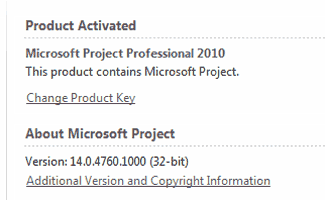
Microsoft Project 2010 (tentang produk)
Microsoft Project 2010 Acivated
Microsoft Visio 2010 (tentang produk)
Microsoft Visio 2010 Acivated
Kelebihan lain dari produk ini adalah kompatibel dengan Windows versi 32-bit maupun 64-bit, atau dapat digunakan pada windows versi 32-bit maupun 64-bit.
Microsoft Office 2010, memiliki kemampuan untuk menyimpan file ke dalam format PDF. Anda dapat membuat file PDF, menggunakan Microsoft Office 2010. Anda cukup 'Save As' file word atau excel, kemudian pilih format file PDF. ( Jika anda ingin membuat, edit, atau konversi file PDF dengan fasilitas yang lebih lengkap, silahkan baca artikel ini ). Selain itu, kelebihan Microsoft Office 2010 Professional juga startup-nya jauh lebih cepat dibandingkan MS Office 2007, lebih user friendly, dan lebih keren dengan temanya yang sangat cocok untuk Windows 7.
System Requirements
  • Processor : 500 megahertz (MHz) processor or higher;
  • Memory : 256 megabyte (MB) RAM or higher;
  • Hard Disk : 1.5 GB; a portion of the disk space will be freed after installation if the original download package is removed from the hard drive;
  • Display : 1024x768 or higher resolution monitor;
  • Operating System : Windows XP with Service Pack (SP3) (32-bit), Windows Vista with SP1 (32-bit or 64-bit), Windows Server 2003 with SP2 and MSXML 6.0 (32-bit Office only), Windows Server 2008 with SP2 (32-bit or 64-bit), Windows 7 (32-bit or 64-bit). Windows on Windows (WOW) (which allows installing 32-bit versions of Office 2010 on 64-bit operating systems) are supported;
  • Other : You don't need to replace hardware that is capable of running Office 2007; it will support Office 2010;
  • Additional : Use of graphics hardware acceleration requires DirectX 9.0c compatible graphics card with 64 MB or higher video memory. Requirements and product functionality can vary based on the system configuration and operating system.
Cara Install Microsoft Office Professional Plus 2010 :
  1. Untuk File yang di Download melalui Direct Link :
    -  Download semua Part ( 16 Part );
    -  Pilih pada salah satu file, kemudian ekstrak dengan WinRAR.
  2. Burn, Mount atau Extract ISO file ;
  3. Jalankan file 'Setup.exe' ;
  4. Pilih produk yang akan diinstall ; ( Microsoft Office Professional Plus 2010, Microsoft Project Professional 2010 atau Microsoft Visio Premium 2010 ).
  5. Untuk menginstall produk yang lain,
    Jalankan lagi file 'Setup.exe' . Pilih produk yang akan diinstall ;
  6. Restart Komputer, untuk menyelesaikan aktivasi.
cat:
Untuk berjaga-jaga agar proses aktivasi berjalan sukses.
Matikan koneksi internet sebelum installasi dimulai, selama proses installasi sampai aktivasi selesai.
* Tested by : webtekniksipil
Windows 7 Enterprise x64 SP1
Windows 7 Ultimate x64 SP1
Windows 7 Home Premium x64 SP1
Windows 7 Ultimate x32 SP1
Windows Vista Professional x32 SP1
Official Site : http://www.microsoft.com

Kamis, 26 Mei 2011

Memperbaiki file atau dokumen rusak dengan File Repair

 File RepairFree Download File Repair 2.1 build 1 - Jika anda mempunyai masalah dengan file atau dokumen yang rusak/corrupt, File Repair bisa dijadikan salah satu pilihan untuk memperbaiki file atau dokumen yang rusak tersebut. File Repair adalah software berlisensi freeware (gratis), yang dapat berguna untuk memperbaiki file atau dokumen yang rusak.
File rusak bisa disebabkan oleh banyak hal, misalnya listrik yang bermasalah (tiba-tiba mati misalnya), koneksi jaringan yang bermasalah (ketika download file), infeksi virus, program aplikasi error dan lainnya. Jika kerusakan file belum parah, kita bisa mencoba memperbaiki dengan salah satu software gratis ini File Repair.
Screenshot :
 File Repair2
Jenis file yang dapat diperbaiki oleh File Repair, adalah :
  • Word documents (.doc, .docx, .docm, .rtf)
  • Excel spreadsheets (.xls, .xla, .xlsx)
  • Zip or RAR archives (.zip, .rar)
  • videos (.avi, .mp4, .mov, .flv, .wmv, .asf, .mpg)
  • JPEG, GIF, TIFF, BMP, PNG or RAW images (.jpg, .jpeg, .gif, .tiff, .bmp, .png)
  • PDF documents (.pdf)
  • Access databases (.mdb, .mde, .accdb, .accde)
  • PowerPoint presentations (.ppt, .pps, .pptx)
  • music (.mp3, .wav)
Sedangkan daftar error yang mungkin masih bisa diperbaiki antara lain :
  • file is not in a recognizable format, atau format file tidak dikenali oleh aplikasi
  • unable to read file, aplikasi tidak bisa membaca file
  • file cannot be accessed, file atau dokumen tidak bisa diakses
  • application cannot open the type of file represented by filename, aplikasi tidak bisa membuka tipe file dengan nama file tersebut
  • out of memory errors, or low system resources errors (error bermasalah dengan memory atau memory sistem yang kecil)
Melihat fungsinya memang aplikasi ini patut dicoba bagi yang sedang mengalami masalah dengan file-filenya yang rusak. Tetapi tidak semua file rusak bisa diperbaiki, jika memang kerusakan sudah parah atau isi file sudah diacak-acak oleh virus, kemungkinan file tidak akan bisa diperbaiki sama sekali.
Penggunaan program ini sangat mudah, tinggal kita klik tombol dengan titik tiga untuk membuka file, kemudian klik tombol Repair. Jika proses berhasil, maka file akan diperbaiki dengan nama seperti yang ada di bagian Output fixed file as. Aplikasi ini hanya bisa digunakan untuk memperbaiki file satu persatu.
Jika File Repair tidak bisa memperbaiki file yang rusak, mereka juga menerima kiriman file rusak melalui email untuk dicoba diperbaiki selama 1-24 jam. Jika bukan data yang sangat penting (sensitif atau rahasia), dokumen bisa dikirim ke email repair@filerepair1.com.

Senin, 16 Mei 2011

Nitro PDF Professional 7.4.1.1 (x86/x64)

Nitro Pdf Professional 7.4.1.1
Nitro PDF Professional adalah salah satu software yang sangat powerfull, untuk mengelola file dokumen kerja anda. Nitro PDF profesional, berguna untuk membuat, mengubah, mengedit, menggabungkan, menganotasi, mengisi formulir, dan menyimpan file PDF dengan standar industri 100%. Anda dapat mengkonversi file Dokumen ke PDF atau sebaliknya.
Membuat, melihat & mengedit semua dokumen PDF Anda dan mendapatkan kendali penuh atas PDF Anda dengan hanya satu aplikasi. Membuat PDF dari Microsoft Office dengan satu klik dan mudah mengkonversi lebih dari 200 jenis file ke PDF. Menyalin, mengedit, dan memasukkan teks, grafis dan seluruh halaman. Menambahkan halaman, penomoran halaman, tanggal dan waktu-perangko. Menambahkan navigasi bantu seperti bookmark dan hyperlink. Untuk pengguna bisnis, Nitro memungkinkan Anda: markup dan review dokumen menggunakan sticky notes, highlighting, and comments. Mengkonfigurasi pengaturan keamanan, dan mengontrol hak pengguna lain untuk mencetak, mengedit, dan/atau menyalin pekerjaan Anda.
Features :
  • Creating PDF-documents from more than 300 file types.
  • onvert and merge multiple files into a PDF-document
  • Batch mode for converting files to PDF-format
  • Scan to PDF-format
  • Creating a PDF from Microsoft Word, Excel and PowerPoint, by pressing a single button
  • Automatic generation of" smart "PDF-documents with bookmarks, links, meta-data and the protection of Microsoft Office
  • Copy text with formatting
  • Export PDF for later in the program separate Microsoft Word, WordPerfect, OpenOffice and other office programs
  • A full export text and images from PDF-document
  • Batch mode for converting several documents
  • Inserting and editing text, including fonts, colors, size, etc.
  • Edit images - delete, add, resize, rotate, crop, replacement and removal
  • Editing images - brightness, contrast, saturation, etc.
  • Editing a PDF-document pages - insert, delete, rotate, crop, removal and replacement of elements
  • Adding headers and footers, watermarks, and text for all pages of the document
  • Add and edit bookmarks and hyperlinks
  • Auto-create links based on keywords and page numbers
  • Optimization, compression and recovery of PDF-documents
  • Edit document properties including metadata and initial view settings
  • Selecting text content using a selection tool, underscores, and crossing
  • Manually adding images, using the" Pencil "
  • Adding shapes to your images, such as lines, arrows, rectangles, ovals, polygons and clouds
  • Adding marks on document pages
  • The possibility of application documents
  • Adding text feedback
  • Sort and manage comments
  • Sending a document to print to the printer
  • Pleasant and stylish user interface in the style of Microsoft Office 2007
System Requirements :
  • Desktop : Windows® XP, Windows® Vista, Windows® 7 (x64 editions supported)
  • Processor : 1 gigahertz (GHz) or faster processor
  • RAM : 512 MB system memory (1 GB recommended)
  • Display : 1024x768 screen resolution
  • Available Space : Up to 520 MB of available hard drive space
  • Microsoft Office 2003 or newer (required for Microsoft Office integrated features)
  • Microsoft .NET Framework 2.0 (or above)
* Tested by : Windows 7 Enterprise x64 SP1
Official Site : http://www.nitropdf.com

Jumat, 13 Mei 2011

CSi Bridge v 15.0 [ Full ]

CSi_Bridge_v_15.0Free Download CSi Bridge v 15.0 [Full ] - CSiBridge merupakan software yang dapat digunakan untuk melakukan pemodelan, analisis dan desain struktur jembatan. Dengan CSiBridge, engineers dapat dengan mudah menentukan geometri jembatan, syarat batas dan load cases. Model jembatan didefinisikan parametrically, menggunakan istilah yang akrab bagi engineers seperti layout lines, spans, bearings, abutments, bents, hinges dan post-tensioning.
CSiBridge desain memungkinkan desain dengan cepat dan mudah dan penyesuaian baja dan beton jembatan. Modeler parametrik memungkinkan pengguna untuk membangun model jembatan sederhana atau rumit dan untuk membuat perubahan yang efisien sambil mempertahankan total kontrol atas proses desain. Jalur kendaraan dapat didefinisikan dengan cepat dan termasuk lebar efek. Bagan Gantt sederhana dan praktis tersedia untuk mensimulasikan pemodelan urutan konstruksi dan penjadwalan.
Terintegrasi sepenuhnya dalam paket CSiBridge desain adalah keunggulan mesin analisis SAPFire ®, termasuk staged construction, penyusutan dan analisis creep, kabel tensioning, camber dan bentuk, geometri non-linear (P-delta dan perpindahan besar), materi non-linear (superstruktur, bantalan, substruktur dan daya dukung tanah), Tekuk dan analisis statis dan dinamis. Semua ini berlaku untuk model komprehensif tunggal. Selain itu, AASHTO LRFD desain disertakan dengan kombinasi otomatis beban, superstruktur desain dan desain seismik terbaru.
System Requirements
Processor :
  • Minimum: Intel Pentium 4 or AMD Athlon 64.
  • Recommended: Intel Core 2 Duo, AMD Athlon 64 X2, or better.
  • A CPU that has SSE2 support is required.
  • The SAPFire® Analytical Engine includes a multi-threaded solver that can take advantage of multi-core CPUs.
Operating System :
  • Microsoft® Windows XP with Service Pack 2 or later, Microsoft® Windows Vista, or Microsoft® Windows 7, 32- and 64-bit versions.
  • With a 64 bit operating system, the SAPFire® Analytical Engine can utilize more than 4 GB of RAM, making it possible to more efficiently solve larger problems.
Memory :
  • Minimum: 2 GB for XP O/S, 4 GB for Vista/Windows 7 O/S.
  • Recommended: 4 GB for 32-bit O/S, 8 GB or more for 64-bit O/S.
  • The problem size that can be solved & the solution speed increases considerably with more RAM.
  • Vista/Windows 7 requires more RAM than XP for the operating system itself.
Disk Space :
  • 6 GB to install the program.
  • Recommended: 500GB or larger Hard Disk Drive (7200 rpm SATA).
  • Additional space required for running and storing model files and analysis results, dependent upon the size of the models.
Video Card :
  • Minimum: Supporting 1024 by 768 resolution and 16 bits colors for standard (GDI+) graphics mode.
  • Recommended: Discrete video card with NVIDIA GPU or equivalent and dedicated graphics RAM (512 Mb or larger) for DirectX graphics mode. The card must be DirectX 9.0c compatible (DirectX SDK Aug 2009 - Build 9.27.1734.0).
  • DirectX graphics mode fully utilizes the hardware acceleration provided by a GPU and dedicated graphics RAM.
  • For better graphics quality in terms of anti-aliasing and line thickness, the device raster drawing capabilities should support legacy depth bias.
Official Site : www.csiberkeley.com
Semoga Bermanfaat
( ==o0o== )

Selasa, 05 April 2011

Autodesk AutoCAD 2013 [32 bit] dan [64 bit] - Full Free + keygen

webtekniksipil-Autodesk AutoCAD 2013Free Download Autodesk AutoCAD 2013 [32 bit] dan [64 bit] - Full Free + keygen. Pada bulan maret 2011 lalu Autodesk merilis versi AutoCAD terbaru, yaitu Autodesk AutoCAD 2013. Dalam Autodesk AutoCAD 2013 ini terdapat beberapa penambahan fitur sehingga lebih fleksibel dalam menciptakan desain 2D maupun 3D. Mengeksplorasi ide-ide desain, dengan fitur baru dari Autodesk AutoCAD® 2013. Memaksimalkan produktifitas anda untuk conceptual design, model documentation dan reality capture.
Screenshoot :
Autodesk AutoCAD 2013
System Requirements
For 32-Bit AutoCAD 2013
  • Microsoft® Windows® 7 Enterprise, Ultimate, Professional, or Home Premium (compare Windows 7 versions) or Microsoft® Windows® XP Professional or Home edition (SP3 or later);
  • For Windows 7 : Intel® Pentium® 4 or AMD Athlon™ dual-core processor, 3.0 GHz or higher with SSE2 technology;
  • For Windows XP : Pentium 4 or AMD Athlon dual-core processor, 1.6 GHz or higher with SSE2 technology;
  • 2 GB RAM (4 GB recommended);
  • 6 GB free disk space for installation;
  • 1,024 x 768 display resolution with true color (1,600 x 1,050 with true color recommended);
  • Microsoft® Internet Explorer® 7.0 or later web browser;
  • Install from download or DVD.
For 64-Bit AutoCAD 2013
  • Microsoft Windows 7 Enterprise, Ultimate, Professional, or Home Premium (compare Windows 7 versions) or Microsoft Windows XP Professional (SP2 or later);
  • AMD Athlon 64 with SSE2 technology, AMD Opteron® processor with SSE2 technology, Intel® Xeon® processor with Intel EM64T support and SSE2 technology, or Intel Pentium 4 with Intel EM64T support and SSE2 technology;
  • 2 GB RAM (4 GB recommended);
  • 6 GB free space for installation;
  • 1,024 x 768 display resolution with true color (1,600 x 1,050 with true color recommended);
  • Microsoft® Internet Explorer® 7.0 or later web browser;
  • Install from download or DVD.
Download Link
Link from Dytoshare :
<update> Link ini, adalah milik dytoshare di Mediafire yang berhasil direcover.
Jika sebelumnya sahabat sedang men-download tapi belum tuntas, sahabat bisa melanjutkan proses download lewat link ini.
File dari link ini merupakan duplikasi dari aslinya, jadi file yang sebelumnya telah didownload, bisa digabungkan dengan file yang menggunakan link ini. </update>
Download AutoCAD 2013 (32 Bit) via Mediafire :
Download AutoCAD 2013 (64 Bit) via Mediafire :
Download Keygen - Tutorial Aktivasi AutoCAD 2013 :
Cara Install :
  1. Download semua part - ekstrak salah satu part dengan WinRAR (otomatis tergabung).
  2. Ekstrak file ISO dengan Power ISO.
  3. Jalankan Setup.exe untuk mulai intall.
  4. Gunakan Keygen yang sudah tersedia untuk aktivasi.
# Tested by Dytoshare : Windows 7 Ultimate 64 Bit (SP1).
# Download sesuai tipe Windows anda (32-Bit atau 64-Bit).
Link from Anda[dot]web :
Download AutoCAD 2013 (32 Bit) dan (64 Bit) :
Keterangan :

Sabtu, 02 April 2011

CSi ETABS 9.7.2 free full [crack]

etabs_9.7.2
Free Download CSi ETABS v.9.7.2 + crack. ETABS atau (Extended Three Dimensional Analysis of Building Systems) adalah software rekayasa struktural dan gempa untuk menganalisis dan desain bangunan bertingkat. Dengan tampilan grafis, tools pemodelan berbasis obyek serta proses komputasi non-linear dan dinamis, ETABS dapat menyederhanakan desain bangunan. Dengan ETABS, proses mendesain bangunan yang dahulu dilakukan secara manual dan waktu yang relatif lama, kini dapat dilakukan dengan cepat dan hasil yang akurat.
Screenshot :
etabs_v_9.7.2
ETABS Features :
ETABS Modeling :
  • Modeling Templates
  • Section Properties
  • Frame Elements
  • Shell Elements
  • Shear Elements
  • Piers and Spandrels
  • Windows and Doors
  • Link Properties
  • Hinge Properties
  • Meshing Tools
  • Automatic Line
  • Constraint
  • Extrusion Tools
  • Floor Diaphragms
  • Developed Elevations

  • ETABS Loading :
  • Seismic Loading
  • Special Seismic
  • Loading Effects
  • Wind Loading
  • Load Cases and Combinations
  • Area, Line, Point and Thermal Loads
  • Live Load Reduction
  • ETABS User Interface :
  • Graphical User Interface
  • Grid Systems
  • Extrudes Views
  • Dimension Lines

  • ETABS Analysis :
  • Response Spectrum Analysis
  • Time Story Analysis
  • P-delta Analysis
  • Sequential Construction
  • Static Pushover Analysis

    ETABS Design :
  • Steel Frame Design
  • Concrete Frame Design
  • Composite Beam Design
  • Shear Wall Design
  • Steel Joist Design

    ETABS Output and Display:
  • Deformed Geometry
  • Moment, Shear and Axial Force Diagrams
  • Section Cuts
  • Video Animations

  • System Requirements :
    ETABS will work on any Windows-based (network installations require Windows XP, Windows Vista or Windows 7), IBM-compatible personal computer with at least the following configuration:
    • Pentium 4, 2.4 Ghz processor or better
    • A minimum of 512 MB of RAM (1.0 GB is recommended)
    • At least 6 GB of free hard disk space. The remainder is needed for analytical scratch files. Large projects may require much more disk space.
    • Windows XP or higher operating system
    • Windows-compatible graphics card and monitor supporting at least 1024 by 768 resolution and 16 bits colors. The graphics cards should also be capable to support OpenGL compatible.
    Download Link :
    webtekniksipil.blogspot.comDownload CSi ETABS v.9.7.2 + crack -    ( 95,1 MB )
    webtekniksipil.blogspot.comDownload Crack Only-    ( 0,3 MB )

    Selasa, 29 Maret 2011

    Kamus Besar Bahasa Indonesia (offline) - KBBI Offline v 1.3

    Free Download Kamus Besar Bahasa Indonesia (Offline)webtekniksipil - KBBI offline v. 1.3. Kamus Besar Bahasa Indonesia (KBBI) versi Offline ini, adalah software kamus berlisensi freeware yang dibuat oleh Ebta Setiawan (www.ebsoft.web.id). KBBI versi Offline ini mengacu pada data dari KBBI Daring (Edisi III), yang diambil dari Pusat Bahasa Kementerian Pendidikan Nasional. Saat ini, versi terbaru dari KBBI offline ini, adalah KBBI Offline 1.3.
    Beberapa fitur yang terdapat pada KBBI offline v 1.3 :
    • Auto search, sekarang kita tidak perlu menekan tombol cari atau menekan enter, ketika menuliskan kata yang akan dicari, program ini akan otomatis melakukan pencarian, kecuali jika hanya 1 huruf hasilnya juga akan huruf tersebut.
    • Pencarian berdasar kriteria : sama, diawali, diakhiri, memuat. Silahkan dipilih kriteria pencarian yang diinginkan.
    • Informasi jumlah hasil pencarian
    • Perbaikan beberapa kata dasar dan definisi yang ada tambahan angka
    • Berbaikan pemilihan kata yang sebelumnya bisa memilih banyak
    • Perbaikan beberapa kesalahan pewarnaan definisi
    • KBBI Offline akan otomatis menyimpan ukuran dan posisi tampilan/window.
    • Proses pencarian lebih cepat dari sebelumnya
    • Menampilkan hasil dalam sistem Paging, sehingga pencarian yang hasilnya banyak akan lebih cepat
    Screenshoot :
    kbbi v 1.3
    KBBI Offline ini bersifat portable, untuk menjalankannya silahkan download KBBI-offline-1.3.zip kemudian buka dengan program kompressi seperti Winzip, WinRar, 7zip dan sebagainya, selanjutnya keluarkan (extract) semua file yang ada didalamnya. Ada 3 buah file, kbbi.exe, data.dat dan kbbi_config.ini, untuk menggunakan, jalankan saja file kbbi.exe.
    Untuk membatasi hasil yang tampil, KBBI Offline 1.3 menambahkan fitur Paging, yaitu yang ditampilkan dibagi-bagi menjadi beberapa halaman. Pengaturan bawaan, jumlah paging ini 200, jika ingin mengubah, silahkan diedit file kbbi_config.ini dengan Notepad dan ganti nilai Paging=200 dengan isian yang kita inginkan, misalnya Paging=500 untuk menampilkan per 500 kata.

    Maplesoft Maple 15 - full crack

    Maplesoft Maple 15 - full crackFree Download Maplesoft Maple 15 - full crack - Maple 15, adalah salah satu software dari Maplesoft yang dibuat sebagai alat bantu untuk memecahkan persoalan matematika maupun pemodelan. Maple 15 dapat mencari, memvisualisasikan dan memecahkan masalah matematika bahkan yan paling kompleks, menambah wawasan dan pemahaman tentang matematika. Maple 15 dapat memecahkan hampir semua cakupan bidang matematika termasuk kalkulus, aljabar, persamaan differensial, statistik, aljabar linear dan transformasi.
    Lebih jelasnya mengenai Maple 15 , silahkan dilihat pada User Manual.
    Screenshot :
    Maple 15
    System Requirements
    Supported Windows 32 bit and 64 bit.
    • Windows XP, Windows 2008 Server, Windows Vista, Windows 7;
    • Pentium III ; 1 GHz Processor or higher;
    • Memory 2 GB of RAM (recommended);
    • 16-bit color at 1024 by 768 (or greater) resolution recommended;
    • 2 GB Harddisk Space;
    • Java Runtime Environments 1.6.0 or Higher Installed.
    cat:   Cara Install, ikuti petunjuk di dalam (file ReadMe).
    * Tested by : webtekniksipil
    Windows 7 Enterprise x64 SP1
    Windows 7 Ultimate x64 SP1
    Windows 7 Ultimate x32 SP1
    Official Site : www.maplesoft.com
    Semoga Bermanfaat
    ( ==o0o== )

    Minggu, 27 Maret 2011

    Microsoft Mathematics 4.0 - free full download

    Free Download Microsoft Mathematics 4.0 [32-bit] dan [64-bit] Full

    Microsoft Mathematics 4.0, adalah salah satu software buatan Microsoft yang berlisensi freeware. Microsoft Mathematics dapat digunakan untuk melakukan perhitungan matematika seperti Trigonometri, Integral, Turunan, Limit Fungsi, Eksponen, Logaritma, Matriks dan masih banyak lagi.

    Microsoft Mathematics dilengkapi dengan kalkulator grafik fitur lengkap dengan kemampuan seperti halnya kalkulator genggam. Juga alat matematika tambahan yang dapat membantu Anda dalam mengevaluasi segitiga, mengkonversi dari satu unit sistem ke unit sistem lain serta memecahkan sistem persamaan.

    Screenshoot :

    Microsoft Mathematics dirancang untuk dapat membantu siswa/mahasiswa dalam memecahkan persamaan langkah demi langkah, sambil mendapatkan pemahaman dasar dalam pra-aljabar, trigonometri, aljabar, fisika, kimia dan kalkulus.

    Screenshoot :

    Sistem Requirements :

    Supported operating systems: Windows 7, Windows Server 2003 Service Pack 2, Windows Server 2008 R2, Windows Server 2008 Service Pack 2, Windows Vista Service Pack 2, Windows XP Service Pack 3
    • .NET Framework 3.5 SP1.  ( free download : Microsoft .NET Framework 3.5 SP 1 - offline installer )
    • Computer processor 500 MHz Pentium processor or equivalent (minimum); 1 GHz Pentium processor or equivalent (recommended)
    • Memory 256 MB of RAM (minimum); 512 MB or more (recommended)
    • Display resolution 800 x 600, 256 colors (minimum); 1024 x 768, 32-bit (recommended)
    • Video Video card with 64 MB of video RAM
    • Disk space 65 MB available disk space
    Microsoft Mathematics, tersedia dalam beberapa versi bahasa, yaitu : Chinese (Simplified), Chinese (Traditional), Danish, Dutch, English, Finnish, French, German, Italian, Japanese, Korean, Norwegian (Bokmål), Portuguese (Brazil), Portuguese (Portugal), Russian, Spanish, Swedish, Thai, dan Turkish.

    Download English version :
    Jika terjadi masalah dengan link download di atas, atau jika anda ingin download versi bahasa yang lain, silahkan berkunjung ke website Microsoft.
    Cat : .Network Framework 3.5 SP1 or Higher, wajib terinstall pada pc anda.

    Jika anda belum punya, silahkan Download disini :

    Sumber :   www.microsoft.com

    Share

    Twitter Delicious Facebook Digg Stumbleupon Favorites More